HomeCatalog🤖 AI / LLMDocling
AI / LLM · PRO TIER

Doclingpro

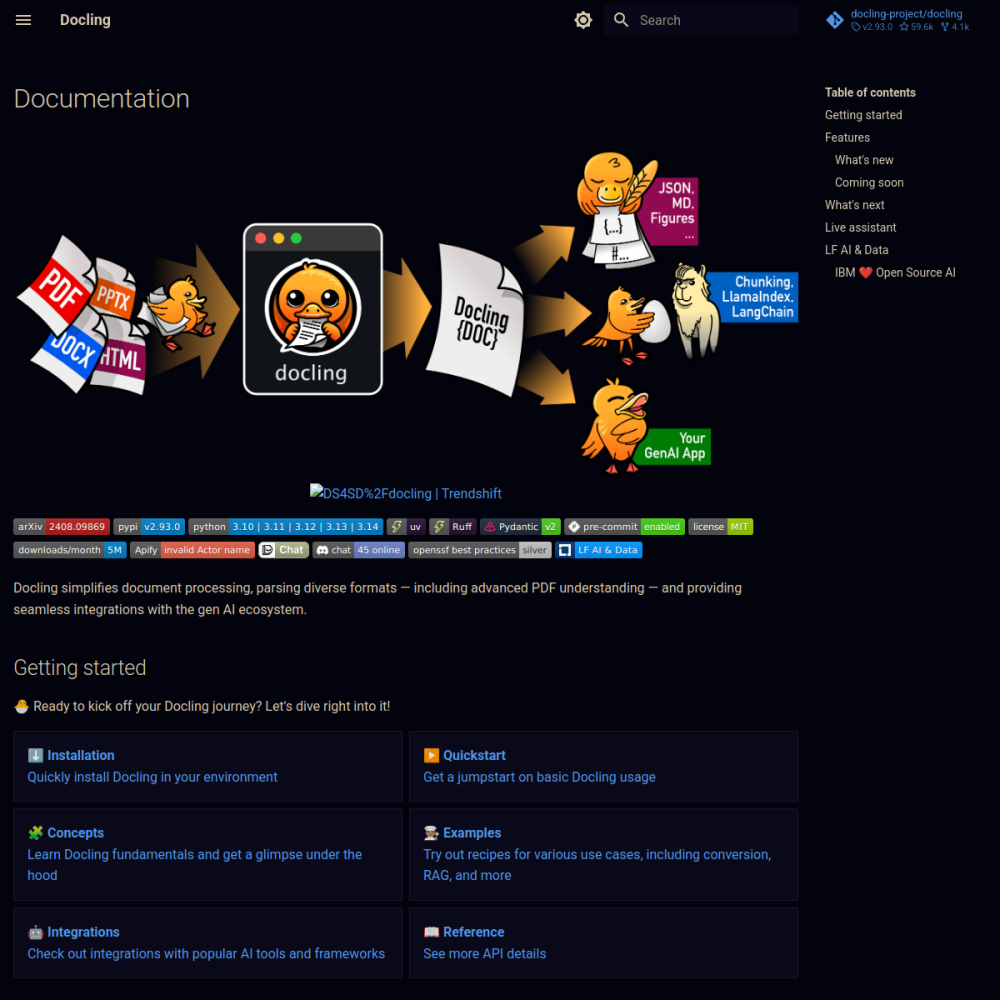
Docling is IBM's document conversion library that transforms PDFs, DOCX, PPTX, HTML into structured Markdown or JSON. Layout-aware OCR, table detection, image extraction, formula recognition — built specifically for RAG preprocessing where document structure matters.

🤖 AI / LLM Min 2048 MB RAM Port 5001 (http) Tier pro
// What it is

A closer look.

Docling is IBM's document conversion library that transforms PDFs, DOCX, PPTX, HTML into structured Markdown or JSON. Layout-aware OCR, table detection, image extraction, formula recognition — built specifically for RAG preprocessing where document structure matters.

The MIT-licensed open-source release is the same engine IBM uses in its enterprise AI offerings — high-quality output that captures semantic structure, not just plain text.

// Use cases

What it's for.

Concrete scenarios where teams pick Docling over the SaaS alternative.

RAG preprocessing

convert your PDF library into clean Markdown for embedding
Document digitization

OCR scanned documents with layout preserved

Knowledge base ingestion

extract structured content from messy enterprise docs

Compliance archival

convert physical documents to searchable format

Content migration

DOCX → Markdown for static site generators

// Who it's for

Built for these teams.

If your team profile matches one of these, Docling is a strong fit out of the box.

Profile A

AI engineers

building RAG pipelines over real-world PDF corpora

Profile B

Knowledge management teams

digitizing legacy document archives

Profile C

Legal & compliance

converting contract PDFs into searchable Markdown

Profile D

Researchers

extracting structured data from scientific papers

Profile E

Tech writers

migrating documentation from Word/PDF to Markdown

// Differentiators

Why teams pick Docling.

When evaluating self-hosted options for this category, here are the dimensions on which Docling consistently lands above the alternatives.

  • Layout-aware — preserves table structure, headers, lists (vs simple text extraction)
  • OCR built-in — handles scanned PDFs with Tesseract integration
  • Formula recognition — STEM papers with equations stay intact
  • Apache 2.0 — IBM-backed but fully open
  • Python-first — clean API, easy to integrate
  • Output flexibility — Markdown, JSON, with optional structured metadata
// Integrations

Connects to.

The stack you'll plug Docling into — services, protocols, and adjacent apps in the BluixApps catalog.

Python API
primary interface; pip install and go
HTTP API mode
Docling-Serve wrapper exposes REST endpoint
OCR engines
Tesseract, EasyOCR pluggable
PDF parsers
pdfium, PyMuPDF backends
LLM frameworks
LangChain document loader available
Output formats
Markdown, JSON, DocLayNet structured format
Embedded image handling
extract or inline as base64
// Adoption & deployment

Notable users & community

  • 20k+ GitHub stars
  • Backed by IBM Research with active engineering team
  • Featured in IBM's enterprise AI stack
  • Strong adoption in research / academic RAG pipelines
  • Growing community around document AI use cases

What we ship

  • Docker compose: Docling-Serve HTTP wrapper
  • Pinned quay.io/ds4sd/docling-serve:latest (release-tagged)
  • HTTPS via Let's Encrypt; API key auth enabled
  • OCR enabled by default with Tesseract
  • Persistent model cache volume to avoid re-download on restart
  • API rate limiting configured for fair use
  • Backup not needed (stateless service)
// Tips & operations

Run it properly.

Operational guidance from running this in production — what to do before you scale, what to lock down, what surprises people.

// PERFORMANCE
Use HTTP mode for multi-language stacks
embedded Python only for Python apps; REST works for any client
// SECURITY
Pre-warm models
first request downloads several hundred MB of model weights; bake into image
// OPERATIONS
OCR vs text extraction
disable OCR for born-digital PDFs; saves 10× processing time
// RELIABILITY
Batch processing
Docling can handle multiple docs per request; batch when possible
// DEPLOYMENT
GPU acceleration
optional but significantly speeds OCR on scanned doc archives
// SCALING
Output cleanup
Docling Markdown can need light post-processing for LLM ingestion
2048
// min ram (MB)
5
// min disk (GB)
5001
// access port
http
// protocol
pro
// bluixapps tier
5001:5001 · quay.io/docling-project/docling-serve:latest
// docker image

Project resources

// Alternatives in AI / LLM

Compare with